Network Diagram Slide Template


Product Description
Not every IT professional has the time to build a network diagram from scratch, and they should not have to. This Network Diagram template is designed to do the heavy lifting, giving technical teams a ready-made visual framework that communicates infrastructure, system connections, and data flow with immediate clarity.
Professional IT Infrastructure Diagram for Technical Presentations
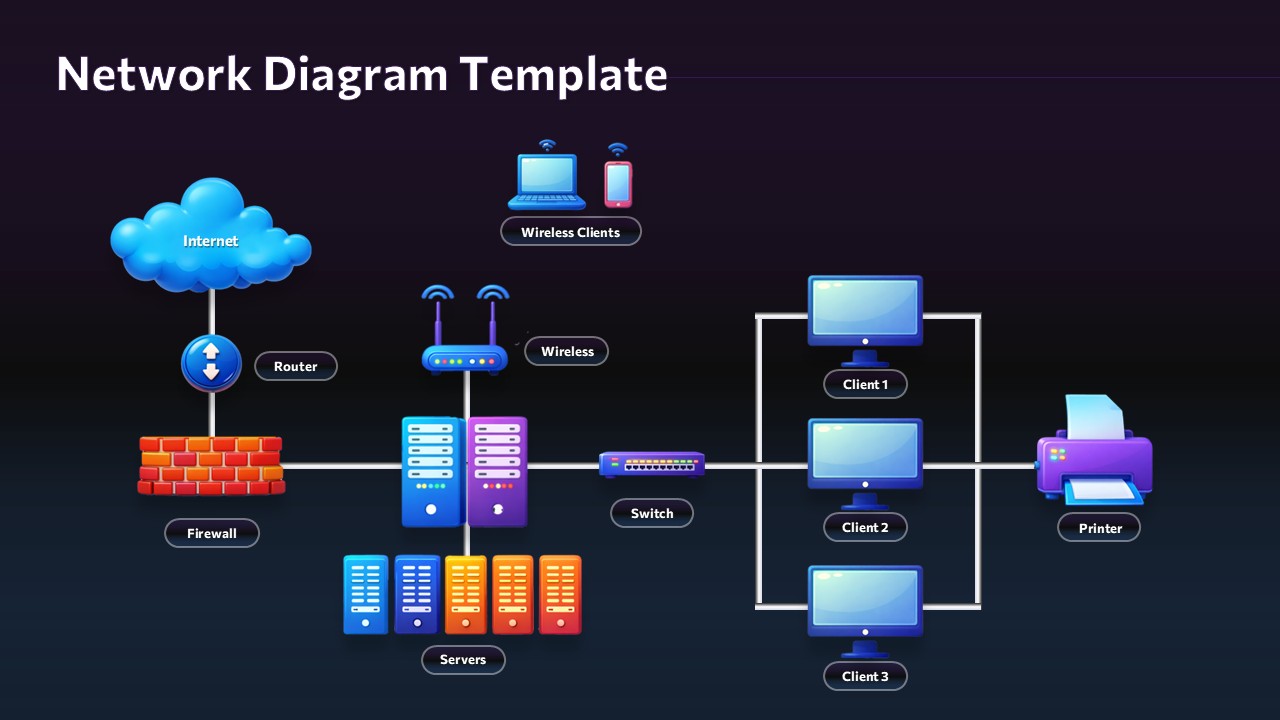
At the heart of the template is a complete hub-and-spoke network topology covering all the essentials: internet connectivity, router, firewall, wireless access points, color-coded servers, central switch, client devices, and a network printer. The logical left-to-right layout guides audiences through data pathways naturally, reducing the need for lengthy verbal explanations during presentations. Two polished theme options keep the design versatile. The light variant uses a clean lavender background with vibrant color-coded components for easy identification, while the dark variant delivers a sharp navy gradient finish that feels right at home in boardrooms and executive briefings. Both themes maintain excellent readability across any display environment.
Fully Editable Network Topology Slide for PowerPoint and Google Slides
Every element is fully editable in Microsoft PowerPoint and Google Slides, including icons, text labels, colors, and component positioning. Scalable vector graphics ensure the design stays crisp at any resolution, making it reliable across both standard and high-definition displays. Professionals creating broader technical workflows can also pair this design with related IT templates for more comprehensive system presentations. IT professionals, network administrators, system architects, educators, and technical consultants will find this template immediately useful across documentation, training, and client-facing presentations.
Download it today and spend less time designing and more time delivering.
Frequently Asked Questions
Can I customize the network components and add additional devices to this template?
Yes, absolutely! All network components in this template are fully editable. You can modify existing device labels, change colors, reposition elements, and add new network components as needed to match your specific infrastructure requirements.
Which slide variant should I use for my presentation?
Choose the light variant for general presentations, training sessions, and documentation where clarity is paramount. The dark variant is ideal for executive presentations, client meetings, and formal settings where you want a more sophisticated, premium appearance.
Is this template suitable for both simple and complex network architectures?
Yes, this template works excellently for various network complexities. You can use it as-is for standard network setups or customize it by adding, removing, or repositioning components to represent more complex enterprise-level infrastructures.
Login to download this file
What do you think of this template?
-
Category:
Technology -
-

-

Aspect Ratio: 16:9
-

Item ID: SPT0629
-

Designed by: Athira
-

Color
Related Templates
-

-
-

-

-

-

-

As-Is To-Be Google Slides & PowerPoint Template
Business Strategy
-

PERT Chart PowerPoint & Google Slides Template
Project Management
-

-

Process Improvement PowerPoint & Google Slides Template
Business Strategy
-

Data Governance Maturity Model Presentation Template
Business Strategy
-