Key Highlights Slide Template
Product Description
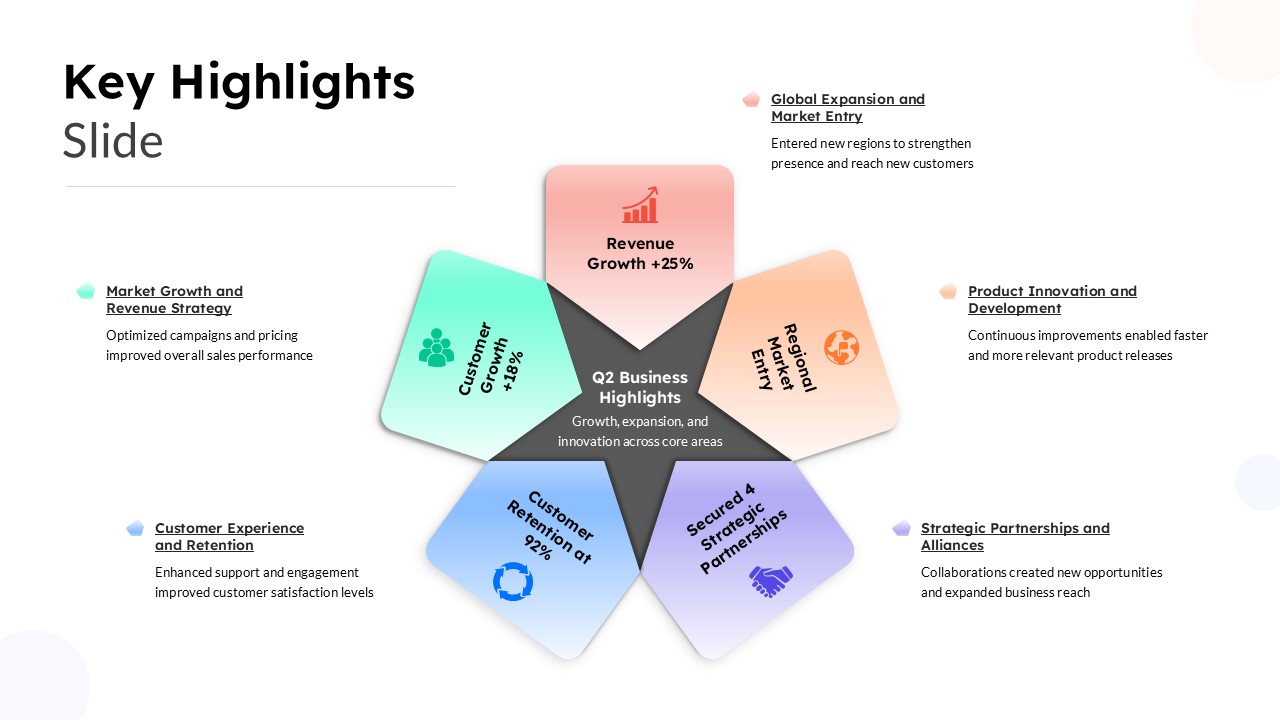
The Key Highlights PowerPoint Template is a modern business presentation slide designed to showcase important results, achievements, and strategic highlights. This PowerPoint template uses a colorful five part infographic layout to present business information in a clear and engaging way. It is a strong choice for quarterly reports, business reviews, company presentations, project updates, and management meetings.
The main graphic places Q2 Business Highlights at the center. Five colorful sections surround the central shape. Each section can display a key result, business metric, or strategic priority. This structure helps you organize several highlights on one PPT slide without making the presentation look crowded.
The template includes editable content areas for:
- Revenue Growth: Present sales growth, financial results, or revenue targets.
- Regional Market Entry: Highlight expansion into new markets, regions, or customer segments.
- Customer Growth: Show customer acquisition, engagement, or retention results.
- Strategic Partnerships: Present new alliances, collaborations, or business relationships.
- Customer Retention: Share retention rates, satisfaction results, or customer experience improvements.
These areas can explain each highlight in more detail. You can replace the sample content with your own business data, statistics, and achievements.
The clean white background gives the PowerPoint slide a professional appearance. Soft pastel colors add visual interest without overwhelming the content. The use of pink, orange, mint green, blue, and purple creates a clear visual distinction between the five sections.
This PowerPoint template works well for corporate teams, consultants, marketers, entrepreneurs, project managers, and business analysts. You can use it for quarterly business reviews, annual reports, investor presentations, strategy meetings, sales reports, and project presentations.
Frequently Asked Questions
What is a Key Highlights PowerPoint Template?
A Key Highlights PowerPoint Template is a presentation slide used to summarize major achievements, results, milestones, or strategic updates. It uses visual sections to organize several important points in one PPT slide.
Where can I use this Key Highlights PPT Template?
You can use this PowerPoint template for quarterly business reviews, company reports, sales presentations, strategy meetings, project updates, investor decks, and management presentations.
Login to download this file
What do you think of this template?
-
Category:
Business -
-

-

Item ID: SPT0884
-

Designed by: Niranjana
-

Color
Related Templates
-

-

-

-

-

-
Key Dates PowerPoint Template
Business
-
-
Content Strategy Roadmap Slide Template
Marketing
-
Pipeline Slide PowerPoint Infographic Template
Infographics
-

Blank Swot Analysis Template PowerPoint & Google Slides Template
Business Strategy
-

-