
Bridge Diagram PowerPoint Template for Presentations
Product Description
- This Bridge Diagram Slide Template gives IT educators, computer science teachers, network engineers, and technology trainers a visually memorable way to explain computer network types using a photorealistic bridge illustration that turns an abstract technical topic into something any audience can immediately connect with. Fully editable in both Microsoft PowerPoint and Google Slides, it works on whichever platform your classroom, training room, or conference setup relies on without any compatibility issues.
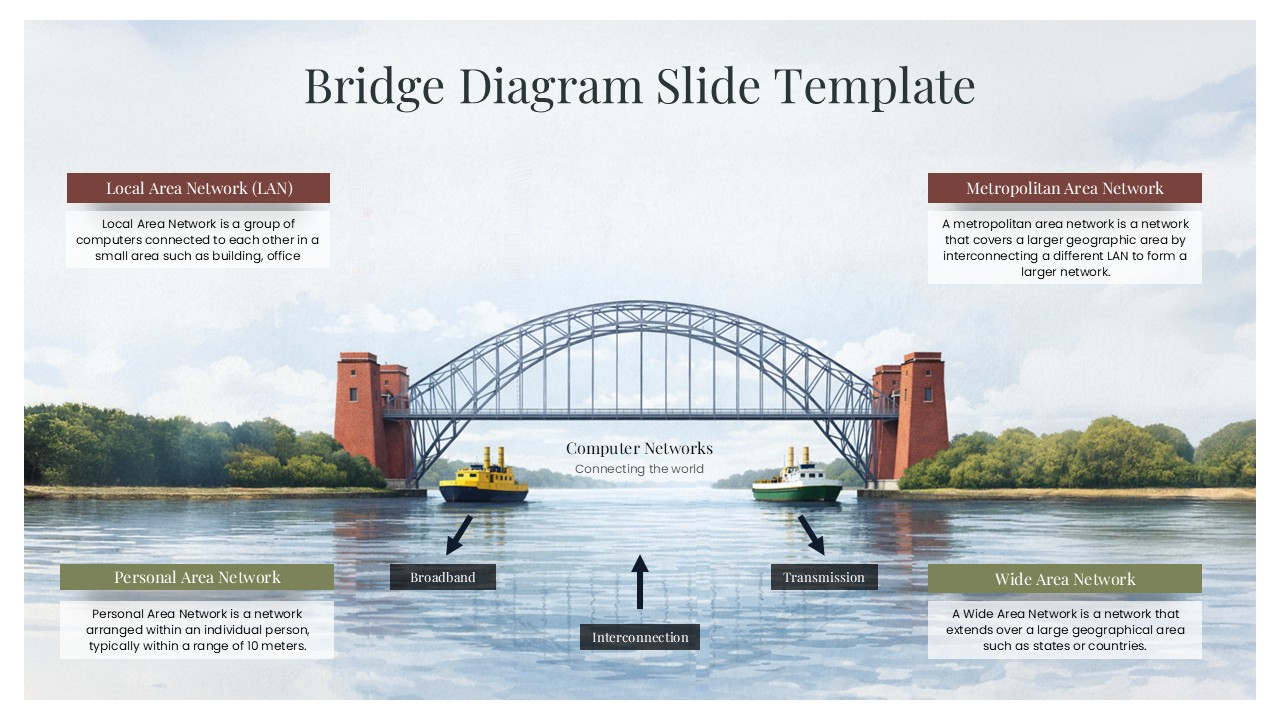
- The centerpiece is a stunning arched steel bridge over a calm river with two boats passing beneath it, carrying the label “Computer Networks: Connecting the World” at the center, a metaphor that does the conceptual heavy lifting before a single annotation is read.
- The Local Area Network panel in the upper left defines LAN as a group of computers connected within a small physical area such as a building or office, giving students and non-technical audiences an accessible entry point into network topology.
- The Metropolitan Area Network panel in the upper right describes MAN as a network that covers a larger geographic area by interconnecting multiple LANs, building naturally on the LAN definition to show how networks scale outward.
- The Personal Area Network panel in the lower left introduces PAN as a network arranged within a range of approximately ten meters around an individual, grounding the concept in everyday personal device connectivity.
- The Wide Area Network panel in the lower right defines WAN as a network extending across large geographical areas such as states or countries, completing the four-tier network taxonomy in a single, spatially intuitive layout.
- The three connection type labels, Broadband, Transmission, and Interconnection, placed along the base of the bridge with directional arrows, give the diagram an additional layer of technical accuracy that makes it credible for both educational and professional audiences.
- Every annotation panel, label, and description field is fully editable, allowing instructors and presenters to update definitions, rename network types, or adapt the diagram for different levels of technical depth without touching the bridge illustration.
Frequently Asked Questions
What is a Bridge Diagram Slide Template?
A Bridge Diagram Slide Template is a presentation slide that uses a bridge visual metaphor to explain concepts involving connection, transition, or network relationships in an engaging and memorable format. It replaces plain text explanations with a spatial, image-driven layout that makes complex technical or conceptual relationships easier for any audience to understand and retain.
Who should use this Bridge PowerPoint Slide Template?
This template is ideal for computer science and IT educators, network engineering trainers, technology solution consultants, and corporate IT teams who need to explain network architecture concepts including LAN, MAN, WAN, and PAN to students, clients, or non-technical stakeholders. It works equally well in university classrooms, corporate training sessions, and conference presentations where visual clarity accelerates understanding.
Login to download this file
What do you think of this template?
-
Category:
Diagrams -
-

-

Item ID: SPT0772
-

Designed by: Athira
-

Color
Related Templates
-

Critical Path Method Template for Presentations
Project Management
-

-

-

-

-

-

-

End to End Process Flow Diagram Template for PowerPoint & Google Slides
Project Management
-

-
-
-

Risk Management Process Diagram for PowerPoint & Google Slides
Risk Management



