
- What Is a Sales Pitch?
- Why Is a Strong Sales Pitch Important?
- How to Make a Sales Pitch in 7 Simple Steps
- Recommended Sales Pitch Presentation Structure
- PowerPoint vs. Google Slides for Sales Presentations
- Sales Pitch Presentation Design Best Practices
- Common Sales Pitch Mistakes to Avoid
- Expert Tips to Improve Your Sales Pitch
- Sales Pitch Presentation Checklist
- Conclusion
How to Make a Sales Pitch That Wins Clients (Step-by-Step Guide for 2026)


- What Is a Sales Pitch?
- Why Is a Strong Sales Pitch Important?
- How to Make a Sales Pitch in 7 Simple Steps
- Recommended Sales Pitch Presentation Structure
- PowerPoint vs. Google Slides for Sales Presentations
- Sales Pitch Presentation Design Best Practices
- Common Sales Pitch Mistakes to Avoid
- Expert Tips to Improve Your Sales Pitch
- Sales Pitch Presentation Checklist
- Conclusion


Whether you’re pitching a product, service, startup idea, or business proposal, your sales pitch can determine whether a prospect becomes a customer. A compelling sales pitch does more than explain what you offer—it builds trust, addresses challenges, and demonstrates why your solution is the right choice.
While speaking confidently is important, a well-designed presentation can significantly improve how your message is received. A professional PowerPoint or Google Slides presentation helps organize your ideas, highlight key benefits, and keep your audience engaged throughout the meeting.
In this guide, you’ll learn how to make a sales pitch step by step, discover proven presentation strategies, avoid common mistakes, and understand how to create slides that support your message rather than distract from it.
| How to Make a Sales Pitch in 7 Steps Understand your audience Identify their problem Present your solution Focus on benefits Build trust with proof Address objections End with a clear CTA |
What Is a Sales Pitch?

A sales pitch is a persuasive presentation that introduces your product, service, or idea to potential customers. Its purpose is to explain how your solution solves a specific problem and encourage the audience to take the next step, whether that’s scheduling a meeting, requesting a demo, making a purchase, or signing a contract.
An effective sales pitch focuses less on selling features and more on communicating value. Instead of talking only about your product, it explains how customers benefit from using it.
A successful sales pitch should:
- Capture attention quickly.
- Address the audience’s pain points.
- Present a clear solution.
- Demonstrate credibility with evidence.
- End with a compelling call to action.
Why Is a Strong Sales Pitch Important?
Today’s buyers are exposed to countless advertisements, emails, and presentations every day. If your presentation fails to make an impact within the first few minutes, you may lose your audience before reaching your main message.
A well-structured sales pitch helps you:
- Build credibility with prospects.
- Communicate your value proposition clearly.
- Differentiate yourself from competitors.
- Handle objections with confidence.
- Increase conversions and close more deals.
- Leave a memorable impression.
Whether you’re presenting to investors, executives, small business owners, or enterprise clients, a structured presentation makes your ideas easier to understand and more convincing.
How to Make a Sales Pitch in 7 Simple Steps
Creating an effective sales pitch begins long before you open PowerPoint. Every successful presentation is built on research, strategy, and a deep understanding of the audience.
Step 1: Understand Your Audience
The biggest mistake sales professionals make is creating one presentation for everyone.
Different audiences have different priorities. A startup founder may care about growth, while a finance executive focuses on cost savings and return on investment.
Before creating your presentation, ask questions such as:
- Who is the decision-maker?
- What challenges are they facing?
- What goals are they trying to achieve?
- Which metrics matter most to them?
- What objections might they have?
The more personalized your presentation, the more relevant and persuasive it becomes.
Expert Tip
Create different versions of your sales presentation for different industries instead of relying on a single generic deck.
Step 2: Start with the Problem

Many presenters begin by talking about their company history, awards, or product features.
Instead, begin by discussing the customer’s problem.
When your audience immediately recognizes their own challenges, they become more interested in hearing your solution.
For example:
Instead of saying:
“Our software includes advanced automation tools.”
Say:
“Many businesses lose valuable hours every week managing repetitive tasks manually. This slows productivity and increases operational costs.”
By focusing on the problem first, your audience naturally becomes curious about the solution.
Step 3: Present Your Solution Clearly
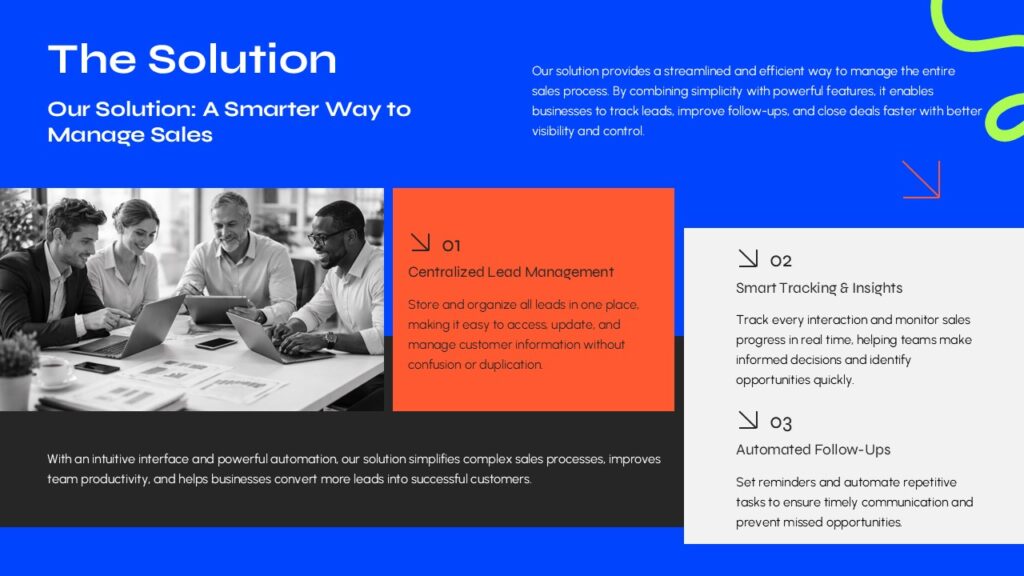
Once you’ve established the problem, introduce your product or service as the logical solution.
Keep your explanation simple and avoid technical jargon unless you’re speaking to a highly specialized audience.
Focus on answering three questions:
- What is your solution?
- How does it solve the problem?
- Why is it better than alternative options?
Visual elements such as process diagrams, comparison tables, and workflow illustrations can make complex ideas much easier to understand.
If you’re creating your presentation in PowerPoint or Google Slides, use clean layouts with plenty of white space instead of overcrowding each slide with text.
Step 4: Highlight Benefits Instead of Features
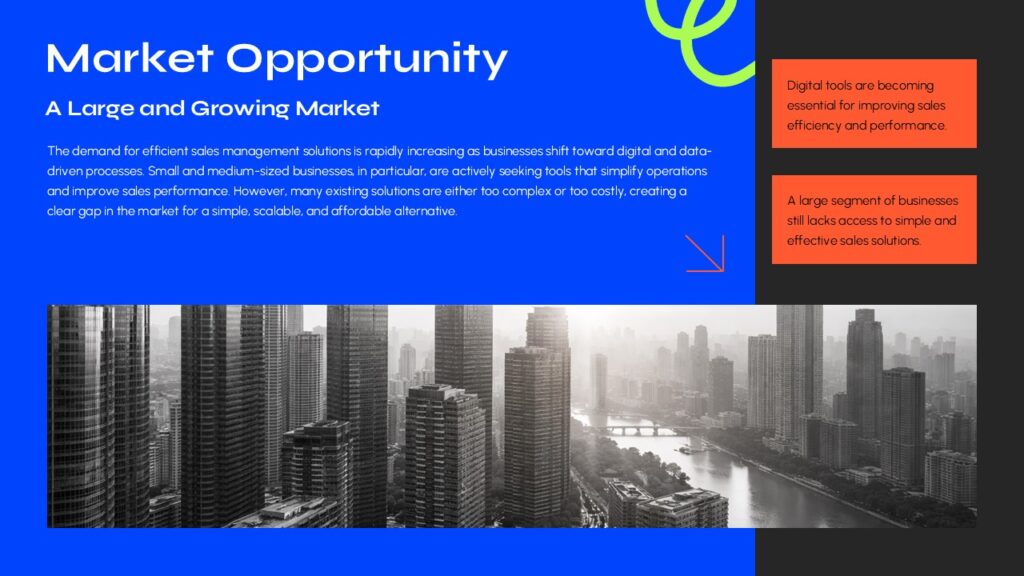
Customers rarely purchase features—they purchase outcomes.
Instead of listing technical specifications, explain the practical value each feature delivers.
| Feature | Customer Benefit |
| Cloud storage | Access files from anywhere. |
| Automation | Save time and reduce manual work. |
| Analytics dashboard | Make faster, data-driven decisions. |
| Collaboration tools | Improve team productivity. |
This simple shift helps prospects visualize how your solution improves their daily work.
Step 5: Build Trust with Social Proof
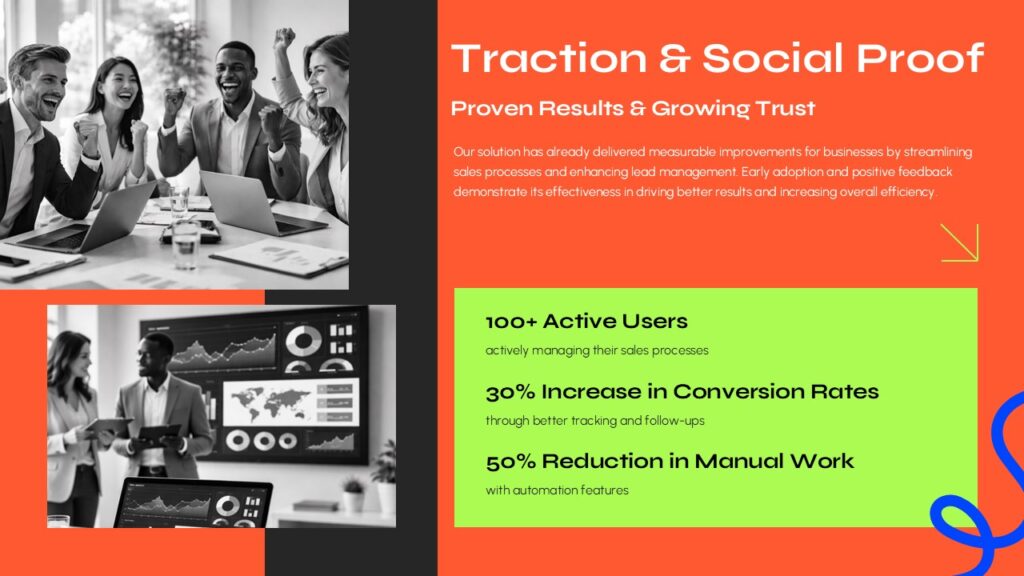
People are more likely to trust your business when they see evidence that others have achieved positive results.
Strengthen your presentation by including:
- Customer testimonials.
- Case studies.
- Client logos.
- Industry awards.
- Success metrics.
- Before-and-after results.
For example:
“Our solution helped a marketing agency reduce reporting time by 60%, allowing the team to focus more on strategy and client growth.”
Supporting your claims with real results makes your pitch significantly more persuasive.
Step 6: Handle Objections Before They’re Raised
Most prospects already have concerns before your presentation begins.
Common objections include:
- Is it worth the investment?
- How long will implementation take?
- Is it easy to use?
- What kind of support is available?
- Why should we choose you instead of competitors?
Address these concerns proactively within your presentation.
A dedicated “Frequently Asked Questions” or “Common Concerns” slide can reduce uncertainty and build confidence.
Step 7: End with a Clear Call to Action
Never assume your audience knows what to do next.
Every sales presentation should conclude with a specific action.
Examples include:
- Schedule a product demonstration.
- Start a free trial.
- Request a personalized quote.
- Book a consultation.
- Contact your sales team.
Keep your final slide clean and focused.
Avoid adding unnecessary information that distracts from your primary message.
Recommended Sales Pitch Presentation Structure
A logical slide sequence helps your audience follow your story from problem to solution.
| Slide | Purpose |
| 1 | Title and introduction |
| 2 | Customer problem |
| 3 | Market opportunity |
| 4 | Your solution |
| 5 | Key features and benefits |
| 6 | Case study or customer success story |
| 7 | Competitive comparison |
| 8 | Pricing or implementation process |
| 9 | Frequently asked questions |
| 10 | Call to action |
This structure works well for business meetings, product demonstrations, client proposals, startup presentations, and sales meetings.
If you’re looking to save time, professionally designed Sales Pitch PowerPoint Template or Google Slides templates can provide a polished starting point. Rather than building every slide from scratch, you can customize layouts for timelines, comparison tables, process diagrams, pricing sections, and customer success stories while keeping your presentation visually consistent.
PowerPoint vs. Google Slides for Sales Presentations
Both PowerPoint and Google Slides are excellent tools for creating sales presentations, but each has its strengths.
| Feature | PowerPoint | Google Slides |
| Design flexibility | Excellent | Very Good |
| Advanced animations | Excellent | Moderate |
| Real-time collaboration | Good | Excellent |
| Offline editing | Excellent | Limited |
| Team sharing | Good | Excellent |
| Enterprise compatibility | Excellent | Very Good |
Choose the platform that best fits your workflow. Regardless of the software you use, prioritize clarity, consistency, and storytelling over excessive animations or visual effects.
Sales Pitch Presentation Design Best Practices
A great sales pitch is supported by a presentation that is visually appealing, easy to follow, and focused on the audience’s needs. Even the strongest message can lose its impact if the slides are cluttered or difficult to understand.
Follow these best practices to create a presentation that reinforces your message instead of distracting from it.
Keep Each Slide Focused
Avoid cramming multiple ideas onto one slide. Each slide should communicate a single key message.
Instead of listing every product feature on one page, dedicate separate slides to major benefits, customer success stories, pricing, or implementation.
A simple rule is:
- One headline
- One key idea
- One supporting visual
This makes your presentation easier to follow and more memorable.
Use Visuals to Explain Complex Ideas
People process visuals much faster than paragraphs of text. Replace lengthy explanations with diagrams, charts, icons, and infographics whenever possible.
For example:
- Use a timeline to explain your implementation process.
- Use a process diagram to illustrate your workflow.
- Use comparison tables to highlight advantages over competitors.
- Use charts to present measurable business results.
- Use customer journey diagrams to explain your solution’s impact.
Professionally designed presentation templates can help you create these visuals quickly while maintaining a consistent look across every slide.
Maintain a Consistent Design
Your presentation should feel like a single, cohesive story.
Maintain consistency by using:
- One or two font families
- A limited color palette
- Consistent icon styles
- Uniform spacing and alignment
- Similar image treatments throughout the deck
Consistency makes your presentation appear more professional and builds trust with your audience.
Limit Text on Each Slide
A common mistake is turning slides into documents.
Instead of writing full paragraphs, summarize your message using short headlines and concise bullet points.
Your presentation should support your explanation—not replace it.
Aim for clear, readable slides that encourage your audience to focus on your presentation rather than reading dense blocks of text.
Use High-Quality Images and Icons
Visual quality reflects your brand. Low-resolution images, inconsistent icons, and outdated graphics can reduce the credibility of your presentation.
Choose professional visuals that reinforce your message and maintain a consistent visual style throughout the deck.
Common Sales Pitch Mistakes to Avoid
Even experienced presenters can make mistakes that weaken an otherwise strong sales pitch. Avoid these common pitfalls.
Talking Too Much About Your Company
Many presentations begin with company history, awards, or office locations.
While credibility matters, prospects are primarily interested in how you can solve their problems.
Focus on the customer’s challenges first and introduce your company naturally as the solution.
Overloading Slides with Text
Slides filled with paragraphs are difficult to read and often cause audiences to lose interest.
Instead, use:
- Short headlines
- Bullet points
- Icons
- Charts
- Illustrations
- Supporting visuals
Your spoken presentation should provide the detail.
Ignoring the Audience’s Needs
A generic presentation rarely performs well.
Whenever possible, customize your examples, statistics, and case studies for the industry or business you’re presenting to.
Even small changes can make your presentation feel more relevant and personalized.
Using Too Many Animations
Animations should guide attention, not entertain the audience.
Avoid excessive transitions, spinning text, or distracting visual effects that take attention away from your message.
Simple fade and appear animations are usually sufficient for professional business presentations.
Forgetting a Clear Call to Action
Your audience should know exactly what to do after the presentation.
Whether it’s scheduling a demo, requesting a proposal, or starting a free trial, end with one clear and specific next step.
Expert Tips to Improve Your Sales Pitch
Experienced presenters know that successful sales presentations are built on preparation, not improvisation.
Here are several strategies that can make your pitch more persuasive.
Tell a Story
Stories help audiences remember information better than isolated facts.
Instead of immediately explaining your product, begin with a relatable customer challenge and show how your solution transformed the situation.
A simple storytelling structure works well:
Problem → Challenge → Solution → Results
Support Claims with Data
Whenever possible, include measurable outcomes.
Examples include:
- Revenue growth
- Cost savings
- Time saved
- Productivity improvements
- Customer satisfaction scores
Specific numbers make your presentation more credible.
Rehearse Before Every Presentation
Practice helps you refine your timing, improve transitions, and identify confusing sections before meeting with clients.
If possible, present to colleagues and ask for feedback on clarity and pacing.
Prepare for Questions
Many purchasing decisions happen during the discussion after your presentation.
Prepare answers for questions about:
- Pricing
- Implementation
- Security
- Support
- Return on investment
- Competitor comparisons
Being prepared demonstrates confidence and expertise.
Sales Pitch Presentation Checklist
Use this checklist before presenting.
- Defined the audience and their goals.
- Identified the customer’s main problem.
- Clearly explained your solution.
- Focused on customer benefits.
- Added testimonials or case studies.
- Included charts, diagrams, or visuals.
- Maintained a consistent slide design.
- Limited text on each slide.
- Rehearsed the presentation.
- Ended with a strong call to action.
Checking these points before every meeting can significantly improve the effectiveness of your sales presentations.
Conclusion
Learning how to make a sales pitch is about much more than creating attractive slides. An effective pitch combines audience research, compelling storytelling, clear messaging, persuasive visuals, and a confident delivery to guide prospects toward a decision.
Remember to focus on the customer’s challenges before introducing your solution. Highlight benefits rather than simply listing features, support your claims with real-world examples, and finish with a clear call to action. Small improvements in structure, design, and preparation can significantly increase the impact of your presentation.
If you’re creating your next presentation in PowerPoint or Google Slides, starting with a professionally designed template can help you organize your ideas faster while maintaining a polished, consistent appearance. Ready-made layouts for timelines, process diagrams, comparison tables, pricing, and case studies allow you to spend less time designing slides and more time refining your message.
Whether you’re pitching a new product, presenting a business proposal, or closing your next client meeting, combining a strong narrative with thoughtful presentation design will help you communicate with confidence and improve your chances of success.
Most business presentations contain between 10 and 15 slides and can be delivered in 15 to 30 minutes. Adjust the length based on your audience and the complexity of your solution.
A good sales pitch focuses on the customer’s needs, presents a clear solution, provides evidence through case studies or testimonials, and finishes with a compelling call to action.
A sales pitch is designed to persuade potential customers to buy a product or service. A pitch deck is typically created for investors and focuses on business growth, market opportunity, and financial projections.
Both platforms are excellent choices. PowerPoint offers advanced design and animation features, while Google Slides is ideal for real-time collaboration and cloud-based presentations.
Most successful sales presentations include 10 to 12 well-structured slides. Prioritize clarity over quantity and avoid adding unnecessary content.

Related Articles
-
 May 8th, 2026
What Is a Business Pitch? Definition & Purpose
Business Presentation Tips -
 May 8th, 2026
What Is the Main Purpose of Developing a Business Pitch? The Complete 2026 Guide for Entrepreneurs
Business Presentation Tips -
 May 8th, 2026
How to Plan and Deliver a Lunch and Learn Presentation That People Actually Look Forward To
Business Presentation Tips


